The question is usually asked the wrong way. It is not "which one is better", but "which one costs less over three years for what I want to do".
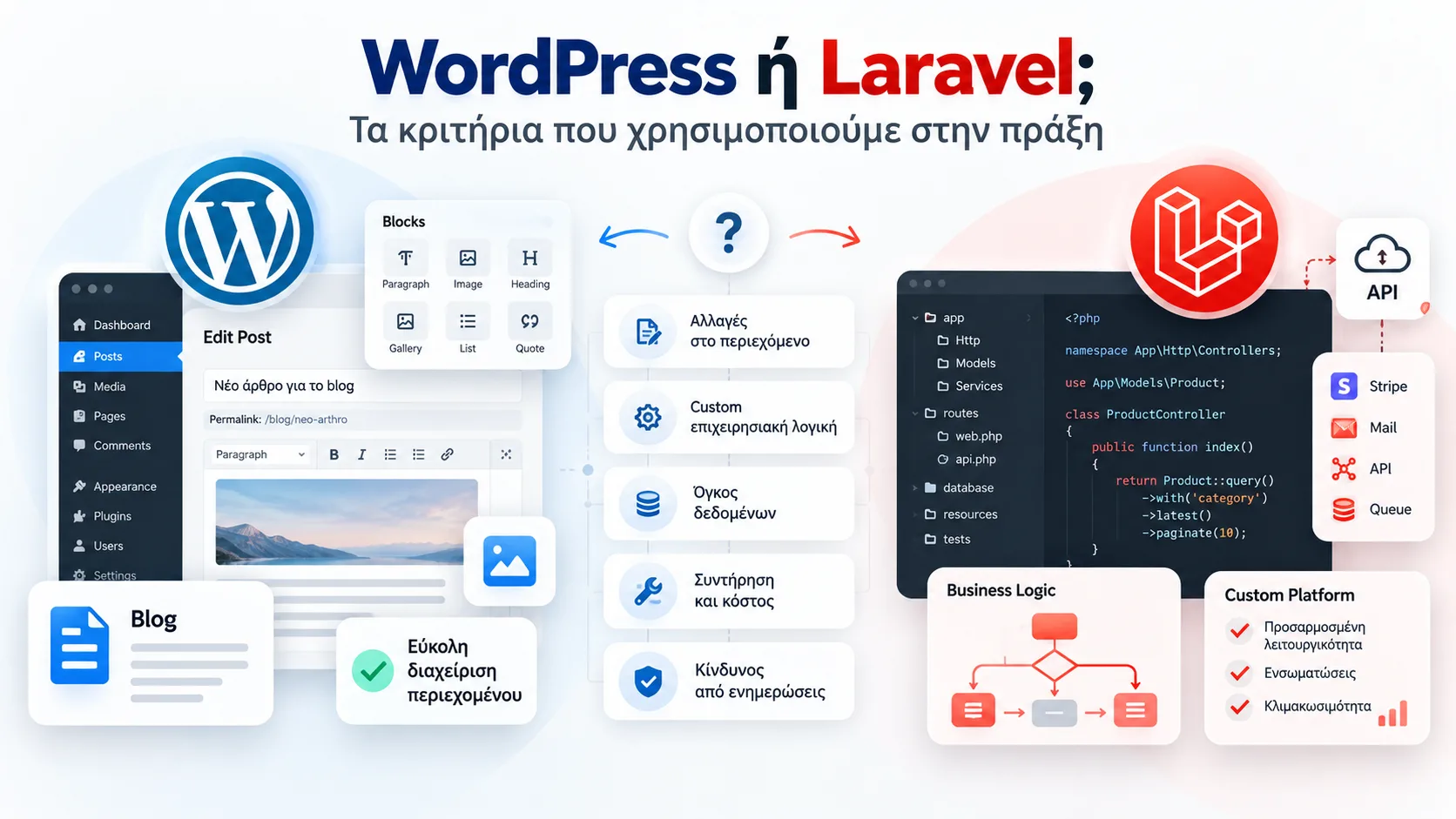
WordPress and Laravel are not competitors in the way it sounds. The first is a ready-made content management system with a huge ecosystem of themes and plugins. The second is a framework: a foundation on which an application is written from scratch, to fit the business. One gives you a lot out of the box on day one; the other gives you exactly what you need, but it has to be built.
That is why the decision is not made on technology. It is made on how your business works. These are the questions we ask in every first conversation.
Five questions that settle the decision
Who changes the content, and how often?
If non-technical people change it every day, WordPress has already solved that problem. If it changes three times a year, the advantage disappears.
A blog with two posts a week, a company publishing news and announcements, a store that changes its offers every Monday: here the WordPress editor, media library and user roles are ready and proven. In a custom system they would have to be written, and every hour spent writing something that already exists is an hour you pay for without reason.
How standard is your logic?
Catalogue, cart, checkout: standard. Per-customer pricing with discount tiers, order approvals and a link to three internal systems: not standard. The more the rules are your own, the more you gain with Laravel.
The practical test is simple: write down how an order leaves your business, from the click to the invoice. If a well-known plugin covers every step, you are on standard ground. If at three steps you write "we do it differently here", you will either bend the business to the tool or build a tool that fits the business.
How much data, and how much syncing?
Tens of thousands of products with frequent price updates from an ERP put pressure on WooCommerce. It is not impossible, but it takes work that often costs as much as a custom build.
WordPress stores product data in a generic way that favours flexibility, not volume. With a few hundred SKUs you will not notice. With stock syncing every ten minutes across thousands of SKUs, you notice it in the speed of the admin and the filters. If that is your case, also read why your store is slow and what it costs you.
Who will maintain it?
WordPress has a huge market of developers; Laravel a smaller but more specialised one. If we leave tomorrow, who carries on?
This question must be answered before signing, not after. On every project we hand over the code, the credentials and the documentation, so you can carry on with whoever you like. In Laravel this matters even more: clean, documented code can be taken over by any experienced developer; messy code by nobody.
How much risk can you take on updates?
On a site with twenty plugins, every update is a small bet. In custom code with tests, an update is a checked process.
Plugins are written by different teams, at different paces and with different care. Most security problems on WordPress sites come from plugins that were not updated or were abandoned. The answer is not to avoid WordPress; it is to keep few, reliable plugins and to update on a schedule, on a copy before the live site.
Our practical answer
- Presentation site or blog: WordPress, almost always. See how we build a presentation website.
- A store of up to a few thousand SKUs with standard logic: WooCommerce. More in ecommerce development.
- A platform with your own rules, roles and flows: Laravel. These are our custom applications.
- Hybrid: WordPress for content, Laravel for the logic, with an API in between. It works, but only when the size justifies it.
Three mistakes we see often
A custom application for something a plugin solves
A simple store written from scratch means paying for a cart, checkout, coupons and emails that already exist, tested by millions of stores. Custom is worth it where your logic is truly your own.
WordPress with forty plugins imitating an application
The opposite mistake. When a site needs ten plugins talking to each other to produce an approval flow, it has outgrown the tool. Every update becomes a risk and every change costs as much as doing it properly would.
Deciding by fashion
Neither "everyone has WordPress" nor "custom is more professional" is a criterion. The five questions above are. An example of a platform with its own rules, payments and course access is Simply Stratos.
How we decide together
In the first conversation we go through the five questions for your business and tell you plainly which solution we recommend and why. If the answer is "you do not need custom", you will hear it from us. Then comes a written proposal with a fixed price and timeline. If you want us to look at your project, write to us or see our consulting.
Frequently asked questions
Is WordPress secure enough for a business site?
Yes, when it is maintained. Most problems come from old or abandoned plugins and weak passwords, not from the core. Few, reliable plugins, regular updates and backups make the difference.
Does a Laravel application always cost more?
At the start usually yes, because things are written that WordPress has ready. Over time, when your logic is complex, it can cost less: fewer plugin subscriptions, fewer workarounds and updates without surprises.
Can I start with WordPress and move to Laravel later?
Yes, and it is often the right order. You start fast, learn what you really need, and build custom only the part that deserves it. Content and URLs move over with redirects, so your Google rankings are not lost.
Which of the two is better for SEO?
Neither on its own. SEO depends on structure, speed, copy and the technical details of the page. Both can be built right, and both can be built wrong.